
Entertainment
Star Trek’s Coolest Bad Guys Accidentally Created The Franchise’s Worst Episode

By Chris Snellgrove
| Published

Pop quiz, hotshot: what do you think the worst episode of Star Trek is? There are some major contenders, including vintage stinkers from The Original Series like “Spock’s Brain” and later slop like “Code of Honor.” However, most fans agree that the worst offender is “Shades of Gray,” the Season 2 finale of Star Trek: The Next Generation. The reason this episode has such an awful reputation is that it’s Trek’s first and only clip show, one that happens to be just as cheap as it is boring.
Ending on such an awful note seemed particularly weird for TNG, whose second season included such bangers as “Q Who?”, which introduced us to the Borg. As it turns out, though, there is a surprising relationship between these two episodes. If The Next Generation hadn’t introduced the bionic baddies who would become the franchise’s greatest villains, “Shades of Gray” would never have been made!
They’re Taking Our Jabs

Here’s a quick recap (just think of it as the text equivalent of a clip show): “Shades of Gray” is an episode where Riker gets a virus from a plant, and he only has hours to live. In sickbay, Dr. Pulaski hooks him up to a device designed to stimulate his neurons so that he can fight the virus off. Of course, the “stimulating neurons” plot is just an excuse for the episode to turn into a clip show where Riker flashes back on various moments from the first couple of seasons. All of these clips inexplicably help to cure Riker, though they will torment Star Trek fans for the rest of our natural lives.
Again, “Shades of Gray” was the first clip show in Star Trek history, and it was so bad that the franchise never made this mistake again. That leads to a fairly obvious question: why did the producers create this episode in the first place? Even in the ‘80s, clip shows had a reputation for being cheap, lazy, and uninspired. Why, then, would a sophomore series trying to be taken seriously resort to the oldest and most hated trick in television history?
Money Talks, Trek Walks

The answer is, of course, money. It might not exist in the 24th century (at least, for Federation types), but cold, hard cash was still very important in the 20th century. Paramount only had so much money to produce Star Trek: The Next Generation, and some episodes cost more than others. This often involved compromise, so if the network shelled out more money for certain scripts, others would get short shrift. This is basically where bottle episodes come from: having certain episodes that require fewer actors and sets makes big, blockbuster episodes that much more affordable.
“Shades of Gray” is much cheaper than standard episodes, and the reason for this is that the network had already blown through quite a bit of cash earlier in the season. As recorded in Captain’s Logs: The Unauthorized Complete Trek Voyages, episode director Rob Bowman said that “Shades of Gray” was Paramount’s way of saying, “We gave you more money for ‘Elementary, Dear Data’ and the Borg show. Now, do us a favor and give us a three-day show. So that’s what you do. It’s an accepted part of the medium.”
When It Comes To Money, Resistance Is Futile

“Elementary, Dear Data” was the episode in which Data played Sherlock Holmes on the holodeck, running afoul of a Moriarty who managed to endanger the entire ship. That episode was also directed by Rob Bowman, who previously noted how expensive it was for Paramount to create the Victorian-era set for Data’s mystery-solving shenanigans. He estimated the cost to be $200,000, which was a huge investment for what was meant to be a one-off episode.
“The Borg show,” of course, refers to “Q Who,” which introduced the Borg into the franchise. While this episode didn’t require the production crew to recreate 19th-century England, it did require them to create an entirely new bionic race as well as a ship design: the iconic Borg cube. Additionally, the episode had a cool new Cube interior set and action scenes galore. On top of that, “Q, Who” featured the return of John de Lancie, the most beloved guest star in Next Generation history. All of those costs added up, leaving very little money left to create the Season 2 finale.
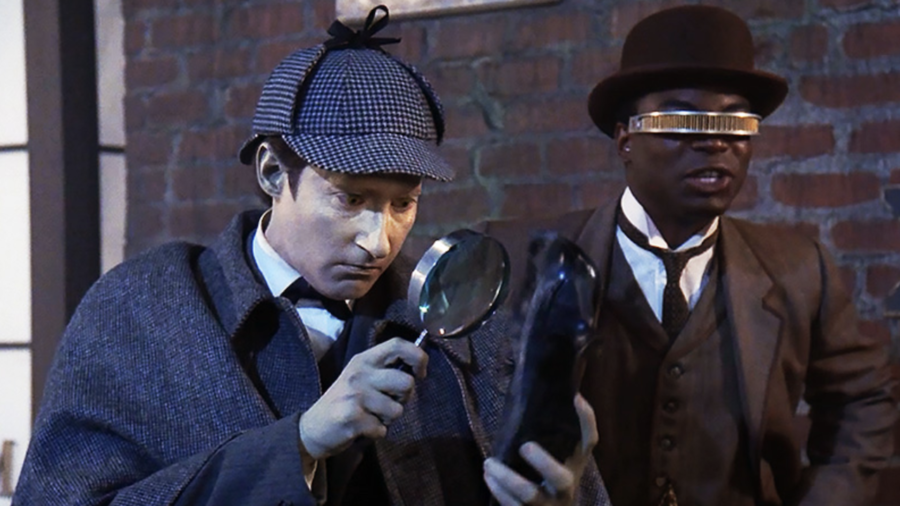
That’s how we got “Shades of Gray:” after spending so much money bringing the Borg to life, the TNG production crew had to create a clip show on a shoestring budget. It was also shot at a record pace of only three days. For context, most early episodes took eight days to shoot, and Rob Bowman was supremely annoyed that he previously had to shoot “Elementary, Dear Data” in only seven days because he felt so rushed. A three-day shoot was unheard of, and the proverbial need for speed is a big part of why this episode (which only featured three sets) is so colossally bad.
Totally Worth It

Arguably, though, “Shades of Gray” was worth it, because this episode was such a hot mess of low-budget slop, the producers had enough money to introduce the Borg into the franchise. They quickly became fan-favorite villains, eventually serving as the Big Bads of Star Trek: First Contact, widely considered the best of the TNG films. Later, they served as the main villains of Voyager before popping up to torment the Enterprise crew one last time in the final season of Star Trek: Picard.
Without the Borg, it’s entirely possible that Star Trek wouldn’t have become such a mainstream cultural phenomenon. Fortunately, these ruthless robots supercharged the franchise, giving fans the coolest villain since Khan. In a true bit of cosmic irony, though, we would never have gotten arguably the greatest bad guys in the franchise if it weren’t for the worst Star Trek episode ever made.
Entertainment
One dashboard, 20+ AI models — get ChatGPT, Claude, Gemini, and more for $79
TL;DR: Pay $79 once (reg. $619) for ChatPlayground AI Unlimited Lifetime and compare 20+ leading AI models side by side, chat with PDFs and images, and generate AI art.
Credit: ChatPlayground AI
If you’ve ever copied the same prompt into three different AI tools just to see which one gives the best answer, you’re not alone. Different models excel at different things — but juggling tabs and subscriptions gets old fast.
ChatPlayground AI puts the top AI models in one place, so you can compare responses side by side without the back-and-forth. For a limited time, a lifetime subscription is on sale for $79 (reg. $619).
GPT-4o, Claude Sonnet, Gemini, DeepSeek, Llama, Perplexity, and more — all in one clean interface. It’s built for people who iterate fast, test variations, and actually care about optimizing results.
Beyond comparisons, ChatPlayground AI includes prompt engineering tools to refine outputs, image and PDF chat for context-aware responses, saved chat history for ongoing projects, and AI image generation powered by leading models. There’s even a Chrome extension to integrate it directly into your browsing workflow.
The Unlimited Plan means unlimited messages per month, making it ideal for startups, product teams, marketers, and prompt engineers who run experiments nonstop. You also get priority support and early access to new features and future models.
If you’re already paying for multiple AI tools — or constantly switching between them — this consolidates everything into one streamlined platform.
Mashable Deals
Grab lifetime access to ChatPlayground AI Unlimited for $79 (reg. $619) and stop juggling models for good.
StackSocial prices subject to change.
Topics
Artificial Intelligence
Entertainment
The best Dyson vacuums actually make vacuuming fun: See my favorites for 2026
Read my full review of the Dyson PencilVac.
The Dyson PencilVac Fluffycones takes the small space vacuum to a whole new level. It’s unbelievably slim and lightweight, and seamlessly scoots into tight crevices near furniture that don’t get dusted often enough. If there are certain spots in your home that you avoid cleaning just because it’s too tight of a squeeze, the PencilVac is about to change your life.
“Fluffy” references the ultra-soft material cushioning the four brush rolls, which provide a gloriously glide on hardwood you don’t want to scratch. The PencilVac’s short battery life and limited suction power wouldn’t be ideal in homes with more than just a few rooms or lots of carpeting.
No stick vacuum takes “stick” as literally as the Dyson PencilVac Fluffycones. It doesn’t have a main body with a battery pack, handle, or dustbin like any other traditional cordless vacuum. It’s just a wand and a funky cleaning head with four microfiber cones as brush rolls — the coolest little vacuum that’s truly grab and go.
The whole vacuum can fit just about anywhere, and tight squeezes are even more accessible with a cleaning head that can spin a full 360 degrees. The agile design led me to so many awkward dusty spots that other cordless vacuums can’t comfortably reach: the small chunks of floor between furniture and the wall, between island and bar stool legs, beside the toilet, or under the low-hanging credenza. The PencilVac had commendable hard floor performance in my apartment, offering near-perfect pickup of daily debris like cat hair and long human hair, kitchen crumbs, multiple types of cat litter, and dust.
Oh yeah, the Fluffycones cleaning head has two dust-detecting lasers. One laser projects out the front to point out the hair and tiny flecks lying ahead, and one laser projects out the back to illuminate anything that you just missed. It’s so satisfying that you’ll accidentally end up cleaning for much longer than you meant to, only to be cut off by the pitiful battery life.
With the precision nozzle wand attached, the PencilVac weighs in at just 2.9 pounds. This uniquely compact design makes cleaning cobwebs out of ceiling corners or dusting baseboards so much less of a pain. The wand’s diameter is just 1.5 inches the entire way down, which made it possible to vacuum behind my dresser without pulling it out a foot from the wall.
Entertainment
RAMageddon is making it harder to find the best Windows laptops. These 10 are actually worth it.
I highly recommend the Acer Swift X 14 for creatives who need a Windows laptop with a discrete GPU for running the most demanding sorts of apps. That includes photo and video editors, graphic designers, and animators.
Most professional creatives need a Windows laptop with a dedicated graphics card to handle their intensive workloads. I like the $2,000 Acer Swift X 14 with a top-end Intel Core Ultra 9 285H CPU and RTX 5070 graphics because it’s super powerful, fairly priced, equipped with a glorious OLED screen, and long-lasting, relatively speaking. You can go with a gaming laptop instead, but most aren’t nearly as compact.
This 14-inch desktop replacement is just as fast as an M5 MacBook Pro when it comes to demanding multi-core scenarios (i.e., most creative tasks). In my testing, its RTX 5070 GPU was more than capable of running graphically taxing games like Cyberpunk 2077 at over 100fps at 1080p resolution without the help of any AI upscaling technology, so it’s very well-suited for the likes of Adobe After Effects and Premiere Pro. (And other AAA games, obviously.)
For what it’s worth, I also tried a $1,700 Acer Swift X 14 AI with an AMD processor and RTX 5060 graphics, and the Intel/RTX 5070 version performed much better. The AMD/RTX 5060 one had 17 percent worse multi-core performance, so it couldn’t compete with the MacBook Pro, and it could barely run Cyberpunk at its 60fps minimum without upscaling tech. It also had a much worse battery life of about 6.5 hours per charge. My go-to RTX 5070 model lasted just over 10 hours, which is fantastic for a laptop with a dedicated GPU.
Note that the Swift X 14 is not a Copilot+ PC, meaning it doesn’t have a super-powerful NPU for running on-device AI tasks. This isn’t a deal-breaker for creatives, but it is for serious machine learning engineers and software developers.
The Swift X 14 comes with plenty of creator-forward ports (like a microSD card slot) as well as a crisp, vivid 120Hz OLED touchscreen. It’s a real attention-getter on an otherwise plain laptop. You can’t draw on it with the included stylus, but you can do so on its haptic trackpad. It functions kind of like a built-in drawing pad.

One dashboard, 20+ AI models — get ChatGPT, Claude, Gemini, and more for $79
Amazon Sundays: Mornings in the Garden


