
Entertainment
Star Wars Deleted Scene Is Worse Than Anything AI Could Come Up With

By Chris Snellgrove
| Published

If you’re ever really hungry for new Star Wars content, you don’t need to rely on Disney+. Instead, all you have to do is bust out your old Blu-rays and check out the special features. There, you will find deleted scenes that may completely change how you see the movie. For example, 2005’s Revenge of the Sith may be a goofy movie, but it has deleted scenes featuring Genevieve O’Reilly killing it as Mon Mothma nearly two decades before she played the character in Andor. Of course, the movie also has a deleted scene that will remind you of just how batsh*t insane George Lucas really is.
This deleted scene has been making the rounds on social media lately, and most who watch it have the same question: “is this AI?” The answer is no, this scene is very real, but it does involve the most famous artificial intelligence in a galaxy far, far away: droids. In this scene, we see Anakin and Obi-Wan discussing droid language, and then Anakin repeatedly speaks the droid language, complete with beeps and boops. It is (and I don’t say this lightly) one of the stupidest things in Star Wars history. However, in a bizarre twist, this scene plays a major part in some largely forgotten franchise lore.
The Dumbest Star Wars Deleted Scene
The deleted Revenge of the Sith scene takes place early in the movie, when Obi-Wan Kenobi and Anakin Skywalker have boarded General Grievous’ ship to rescue Chancellor Palpatine. They have been in communication with R2-D2, but Anakin’s translator breaks. He asks his mentor if he can understand what the astromech is saying, and Obi-Wan responds by reminding his former padawan, “I’m not a protocol droid.” Anakin then tries to translate part of what R2 said, complete with droid noises. He does so again when Obi-Wan corrects him about the interpretation (namely, that the droid wants them to go up, not down).
The scene is wonderfully absurd. It wouldn’t be so crazy for Anakin Skywalker to simply know what R2-D2 is saying. At different points in the franchise, we have seen characters like Luke Skywalker, Poe Dameron, and Rey understand droids’ binary language without the use of a translator or a protocol droid. But actually having Anakin speak that language out loud, with perfect robotic inflection, is insane. Could anybody do this (kind of like how Han Solo learned to speak Wookie), or is this a Jedi thing? If nothing else, the scene is hilarious because it sounds like Anakin is cursing, and his vulgar language has been bleeped (or should we say beeped?) out.
Did Obi-Wan Use DuoLingo?
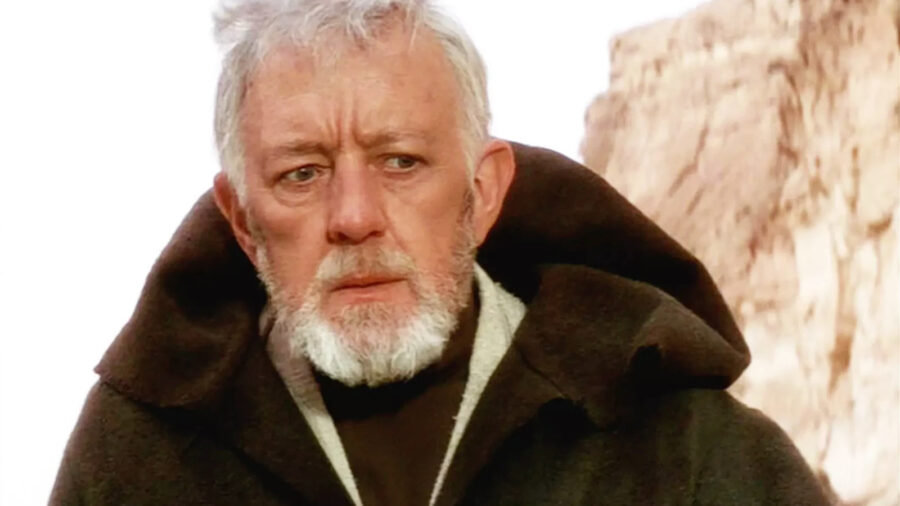
As stupid as this Revenge of the Sith deleted scene is, though, it arguably plays an important part in the lore. For example, many fans think that Obi-Wan Kenobi can understand what R2-D2 is saying in A New Hope because he speaks to the droid conversationally and finds Princess Leia’s hidden message so easily, possibly because R2 had told him what to do. If that’s true, then it’s evidence of weird character development. Obi-Wan couldn’t speak Binary (the droid language) in Revenge of the Sith, but he may have found the time to do so while watching over young Luke Skywalker (after all, there’s not much to do on Tatooine).
Additionally, the Anakin in this deleted scene is a bit more like his later portrayal in the Clone Wars cartoon. Over the years, some fans have felt like there were basically two different Anakins: the brooding, future Vader of the prequels and the quirky, slightly wacky Jedi warrior of the cartoon. Here, we see that these two Anakins are one and the same, and the same guy who would be slaughtering children by the end of the film is doing robot impressions at the beginning.

This isn’t the most important deleted scene in Star Wars history, but it might just be the weirdest. It shows us a different side of Anakin Skywalker while also injecting a bit of sideways humor into an otherwise very serious film. In its own way, this scene also hints at Anakin’s future transformation into Darth Vader because (based on his goofy beeps and boops) he was clearly “more machine than man” long before his duel with Obi-Wan Kenobi.
Entertainment
Shakespearean Parenting


By the wonderful Grace Farris.
P.S. Shakespeare’s witches and ancient Greek parenting.… Read more
The post Shakespearean Parenting appeared first on Cup of Jo.
Entertainment
Logan Pauls hunt for a Pokémon card that doesnt exist, explained
It’s only been a few months since Logan Paul’s $16 million Pikachu Illustrator Pokémon card sale set a record, but he’s already on the hunt for something more valuable.
The controversial YouTuber-turned-WWE star released a one-hour mini-documentary on YouTube on Friday, chronicling his quest to acquire a card that doesn’t exist yet.
So what exactly is he trying to do, and why is the Pokémon card he’s trying to acquire potentially so valuable? Let’s break it down.
Which Pokémon card is Logan Paul trying to acquire?
In a nutshell, the origin of Pokémon cards can be dated back to 1996. Rather than being sold in packs, the first trading cards were available to peel from sheets found in a Japanese comic called CoroCoro. Pairs of cards were released over a number of issues, with the first – issue 223 – containing Pikachu and Jigglypuff cards.
The catch? Although there are many of these cards in circulation, there is apparently still no Pikachu that’s been graded a perfect 10 by the Professional Sports Authenticator (PSA) body.
Mashable Trend Report
The video above chronicles Paul’s attempt to secure one, following him as he buys copies of CoroCoro 223 along with pre-production sheets of the cards that came with the issue, hoping to peel a Pikachu card that’s high enough quality to make the grade of Gem Mint 10 (categorised on PSA’s website as a “virtually perfect card”).
This Tweet is currently unavailable. It might be loading or has been removed.
When will we know if Logan Paul has acquired the PSA 10 Pikachu?
This is the big question. Normally getting cards graded with PSA takes time (from five to 25 business days), but in the documentary we see Paul getting two cards graded far more quickly after dropping them off at one of the PSA offices himself.
At the end of the video, he announces a live streaming event where he will peel the Pikachu card that he hopes to get graded a 10. What we don’t know is what will happen next. Will the event end with Paul showing the card off and getting ready to take it to PSA? Or does he have the kind of relationship with the authenticator where he’ll be able to organise for one of its graders to attend the event, and do the grading in person?
We’ll have to wait for the stream, which is happening July 30 at 9:30 p.m. EST on Paul’s YouTube channel, to find out.
UPDATE: Jul. 31, 2026, 2:45 p.m. Logan Paul completed his livestream on Thursday, peeling the Pikachu on YouTue — but based on the card’s centering, he doesn’t think it’ll achieve the PSA 10 grade needed to complete his mission.
Entertainment
Samsungs 55-inch M80H Mini LED TV has never been cheaper — save over $100 this weekend
SAVE $162: As of July 31, the Samsung 55-inch M80H Mini LED 4K TV is on sale at Amazon for only $537.99. That’s 23% in savings and its lowest price on record.
$537.99
at Amazon
$699.99
Save $162
Traditionally, it may not be the best time to buy a new TV, but logically, it certainly is. Not only is the 2026 NFL season right around the corner, but plenty of new movies and TV shows will also hit the airwaves in the coming months (Mother Mary, Ted Lasso Season 4, Reacher Season 4, Survivor Season 51, more than likely Disclosure Day, etc.). Plus, this Samsung Mini LED model is down to its best price ever.
As of July 31, the Samsung 55-inch M80H Mini LED 4K TV is just $537.99, down from $699.99. That’s a saving of over $160, marking its lowest price on record according to our favorite price-tracking tool.
Mashable Deals
The M80H is a step up from your basic LED TV, featuring a Mini LED display that uses loads of tiny LEDs for brighter, more accurate colors and more cinematic contrast. It’s not as impressive as an OLED TV, but it’s definitely more preferable if you’re on a budget. It also includes an NQ4 AI Gen2 Processor, which has companion features like Samsung Vision AI and the AI Sound Controller. These added perks let you elevate specific parts of the sound or add more depth to certain scenes.
For gamers, the M80H is a solid pick, as it features the Motion Xcelerator 144Hz for supporting PC gaming, DLG 240Hz for smoother motion and response times, AMD FreeSync Premium, and an in-game menu that lets you control FPS, input lag, and more.
Mashable Deals
If your old TV has seen its final days, there’s never been a better time to grab Samsung’s 55-inch M80H Mini LED TV.

VC-backed startups commit more fraud, and researchers think they know why
Fresh off its Wiz payout, Index Ventures raises $2B across three funds


